Webservices
The Plan
- API
- Webservice
- Definition
- Examples
- Microservices Architecture
- Hyper Text Transfer Protocol
- Definition
- Examples
API
Definition
API = Application Programming Interface
Note
Interface between two computers or two programs.
It is an application that provides services to other applications.
The application implements an API or exposes an API.
A fairly broad term that covers:
- Libraries / frameworks:
- Webservices
- A way to access hardware resources
API in a Nutshell
- Exposes methods/functions to users
- Reusable
- Black box
- Contract between provider and user on inputs/outputs
Note
An API provides a service to users without them needing to know how it works. They only know what it expects as input and what it produces!
Webservices
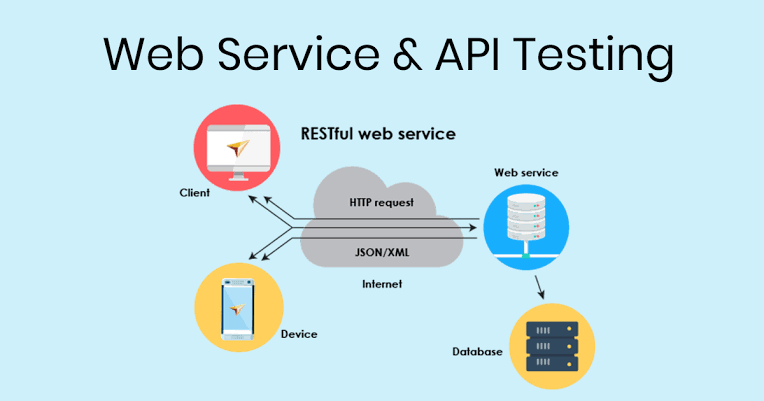
A specific type of API.
Question
In your opinion, does X allow everyone to directly access their databases?
Wait what?!
- But many sites use X’s data!
- How do they do it?
Any ideas?
Solution: Web Scraper
Involves writing an application that:
- Connects to a site
- Reads the page to extract information
Problems:
- Creates artificial traffic (on the site’s side)
- Any change in the site breaks our application
- Managing JavaScript 😱😱😱😱
Another Solution: Create an Entry Point for Machines
- Accessible from the web
- Made for machines
- Controls what is made accessible
Interface between the outside and our system
Démo
Webservices
- Web application
- Accessible via HTTP/HTTPS request
- No graphical interface
- Returns data understandable by machines (JSON, XML, etc.)
Several Types
- REST: most common, the type you will handle, JSON
- SOAP: more complete but heavier than REST, XML
- RPC: Remote Procedure Call
In Summary
Note
A web service is an application module, accessible over the HTTP protocol via a URL that will respond to a request
➡️ Like a website, but for machines
Microservices Architecture
E-commerce site:
- Authentication WS
- Account management WS
- Payment WS
- Search WS
- Data analysis WS
- Cart management WS
Microservices Architecture
- Each module is an independent web service
- It is the client-side application that will contact them
Note
Useful for large companies with many developers and parallel projects.
How Does It Work?
The Client-Server Concept
- THE MODEL THAT GOVERNS THE WEB
- Machines waiting for requests: servers
- Machines making requests: clients
- The client initiates contact, the server responds
Real-Life Comparison
- You are walking down the street and want a Double shot espresso and Cream
- You enter a Starbucks and order your coffee
- The server processes your request and gives you your coffee
- You leave with your coffee
Hyper Text Transfer Protocol (HTTP)
HTTP
Client-server communication protocol developed for the World Wide Web
Not the only one: FTP, SMTP, IRC…
There are non-client-server protocols: BitTorrent
Secure Sockets Layer (SSL)
Secure connection between a client and a server:
- The client sends a message to the server
- The server responds and sends its certificate
- The client verifies the validity of the certificate
- The client generates a session key encrypted with the server’s public key
- Both parties communicate with the session key
Video
Les éléments d’une requête
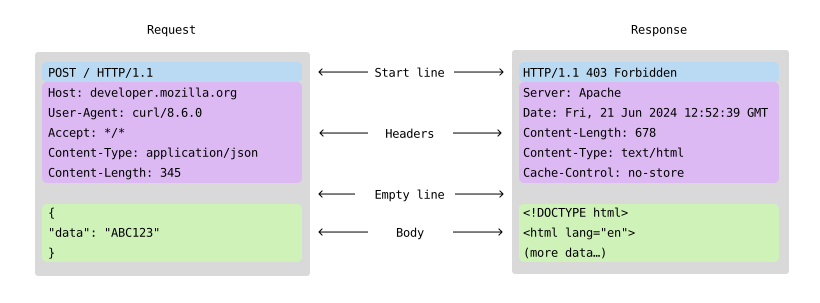
- Location of the resource: URL (domain name + path)
- Method used (GET, POST, UPDATE, DELETE…)
- Request parameters
- Request body
Elements of a Request
GET https://pokeapi.co/api/v2/pokemon?limit=10&offset=200
- method
- protocol
- ws address
- endpoint
- parameters
HTTP Methods
- POST
- GET
- UPDATE
- DELETE
Important
C’est le CRUD !
Example
- GET http://web-services.domensai.ecole/attack
- retrieve all attacks
- GET http://web-services.domensai.ecole/attack/2684
- retrieve an attack by its id
- DELETE http://web-services.domensai.ecole/attack/2684
- delete an attack
- POST http://web-services.domensai.ecole/attack
- add an attack
- PUT http://web-services.domensai.ecole/attack/2684
- modify an attack
In Summary
- HTTP is the protocol of the web
- Method
- URL
- Parameters in URL or body
Contacting/Creating a Webservice
Contacting a Webservice
A tool: an HTTP client
- A web browser (quite limited)
- Insomnia/Postman/Bruno
- Vscode with plugins
- Python with the
requestsplugin
Contacting a Webservice in Python
import requests
# Building the request
url = "https://data.rennesmetropole.fr/api/records/1.0/search/"
parameters = {"dataset": "etat-du-trafic-en-temps-reel", "rows": 2}
# Launching the request
res = requests.get(url=url, params=parameters)
# Displaying the result
print(res.json())
print("\nNumber of rows: ", res.json()["parameters"]["rows"])
import json
import requests
url = "https://anapioficeandfire.com/api/"
end_point = "characters"
parameters = {"gender": "Female", "isAlive": True, "culture": "Braavosi"}
response = requests.get(url=url + end_point, params=parameters)
# Check if the server responded
if response.status_code != 200:
raise Exception(f"Cannot reach (HTTP {response.status_code}): {response.text}")
print(json.dumps(response.json()))- Very easy
res.json()returns a dictionaryget()can becomepost(),put(), etc.
Creating a Webservice in Python
- May seem complex 😵
- But there are tools to help us 😎
- No need to be a computer expert! 🐱💻
3 Frameworks
- FlaskRESTful: mature, lightweight, flexible
- Django: mature, robust, complete
- FastApi: young, lightweight, modern
FastApi: The Basics
FastApi
- It is easy to code your endpoints
- The documentation is extremely well done
- You focus on the essentials