Git
Cyriel Mallart
Ludovic Deneuville
Rémi Pépin
Introduction
- What is Git?
- Version control system: tracks changes in code, allows collaboration, and helps manage project history.
- Why use Git?
- Work on different features simultaneously, revert mistakes, and collaborate efficiently.
How Git Works
Local vs. Remote Repositories
- Local: Your personal copy of the project on your machine.
- Remote: A shared repository hosted on a server (e.g., GitHub, GitLab).
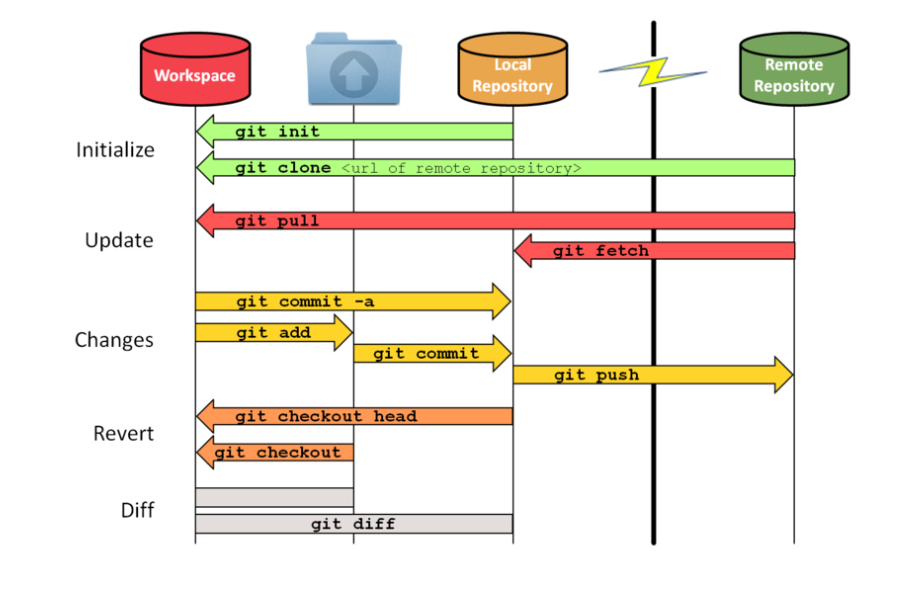
Basic Workflow
- Make changes locally.
- Stage changes.
- Commit changes to your local repository.
- Push changes to the remote repository (or pull changes from it).
How Git Works
Setting Up Git
Configure Git (one-time setup):
Initialize a Repository:
- This creates a hidden
.gitfolder in your project directory.
- This creates a hidden
Basic Git Commands
Check Status
See which files are modified, staged, or untracked:
Stage Changes
Add files to the staging area:
Commit Changes
Save staged changes to your local repository:
View History
See the commit history:
Connect to a Remote Repository
Add a remote repository (e.g., GitHub):
Push changes to the remote repository:
Pull changes from the remote repository:
Clone a Repository
Copy a remote repository to your local machine:
Branching Basics
Why use branches?
- Work on features or fixes without affecting the main codebase.
- Best practice for working as a team : 1 branch per “big part”
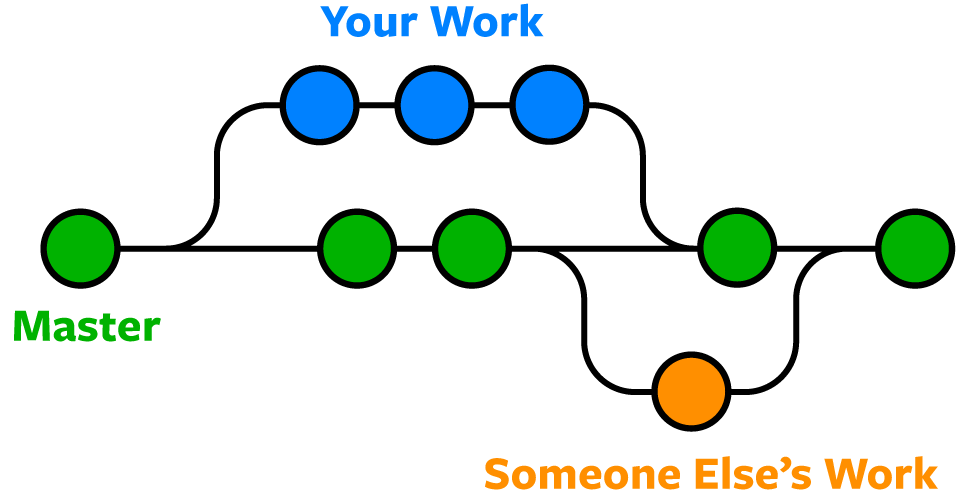
Branching Basics
Create a Branch:
Merge a Branch:
Common Mistakes and Fixes
- Oh no I messed up:
- Step 1 : do not panic
- Step 2 : READ the error message / git status and check history
- Step 2 : remember you can always go back to a previous version
- Step 3 : Google is your friend
Common Mistakes and Fixes
Undo Changes:
- Undo a commit (keep changes):
bash git reset --soft HEAD~1 - Discard unstaged changes:
bash git restore <file>
Common Mistakes and Fixes
Resolve Merge Conflicts:
If Git reports conflicts during a merge, manually edit the conflicting files, then:
Wrap-Up
Recap:
- Git tracks changes, allows collaboration, and manages project history.
- Use
git add,git commit,git push, andgit pull. - Branches help manage features and fixes separately.
Wrap-Up
Practice makes perfect:
- Experiment with Git commands during the lab work (do NOT designate 1 “Git expert”)
- Solve issues by communicating about what happened